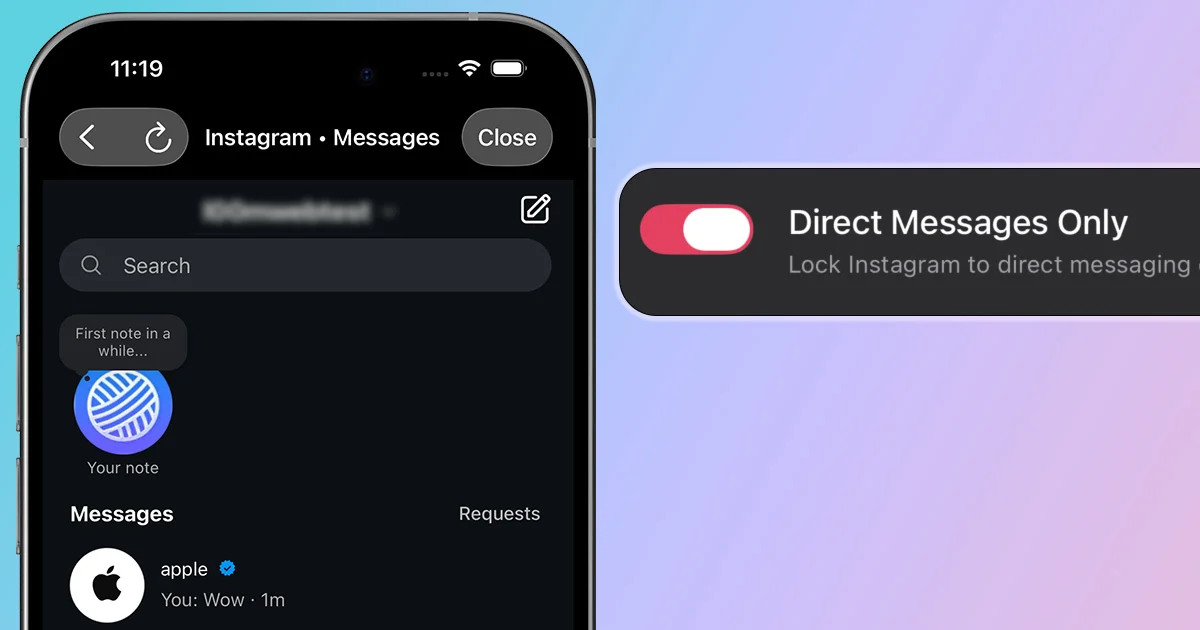
A lot of people use Instagram to communicate through DMs. The problem is that Instagram does not have a dedicated messaging app, so every time you open it to send a message, you have to dodge features designed to hijack your attention and pull you into doomscrolling before you even reach your inbox. Even inside DMs, a Reel from a friend can turn into an endless scrolling session after you open it. If this sounds a little too familiar and you want to use Instagram for DMs only on iOS or Android, this guide is for you.
Option 1: Use Instagram for DMs Only With LoomWeb
LoomWeb lets you create an Instagram Weave that locks the experience to direct messaging. Instead of relying on willpower every time you open Instagram, you create a dedicated path for messages.
- Download LoomWeb from the App Store or Google Play
- Create a new Instagram Weave
- Enable Direct Messages Only
- Save the Weave with a clear name like "Instagram DMs"
- Open that Weave when you need to send or reply to messages
You can still see Reels your friends send you, but you can't start doomscrolling after opening one from DMs.
Want Instagram messages without the doomscroll?
Option 2: Open Instagram Direct From a Bookmark
You can also open Instagram's direct message URL in a browser. This can reduce the number of taps between you and your DMs.
However, a bookmark is only a starting point. Navigation, links, and habit can still pull you back into the feed, Reels, and Explore because it does not actively block those areas.
Who Should Use DM-Only Mode?
- People who use Instagram for group chats or creator messages
- Students who need to stay reachable but avoid Reels
- Creators who respond to messages but do not want to browse
Frequently Asked Questions
Can I use Instagram only for direct messages?
Instagram does not include an official DM-only mode. LoomWeb's Direct Messages Only patch creates a focused Instagram Weave that keeps the inbox available while blocking the main browsing areas.
Can I temporarily use the rest of Instagram again?
Yes. Your DM-only Weave is a focused way into Instagram, not a permanent account change. You can edit the Weave or use a different setup when you intentionally want access to other features.
The Bottom Line
You should not have to delete Instagram just to protect your attention. If direct messages are the part you value, make them the part you keep.
With LoomWeb's Direct Messages Only patch, Instagram becomes smaller, calmer, and more useful. You get the conversation without the feed.
Make Instagram a Messaging Tool
Download LoomWeb and create a DM-only Instagram Weave for focused communication.